

sessionpipe is an open protocol (CC BY 4.0) and an Apache-2.0 command-line client that installs hooks into Claude Code, Codex, Gemini CLI, Antigravity and Devin. Each hook becomes one of 17 event types, secrets are removed on your machine, and the events go to destinations you choose, each filtered to a privacy tier from 0 (presence) to 3 (full). A separate open-source GUI, sessionpipe-gui, shows every session on all your machines on one board. At publish, the client is 0.10.0 (released 2026-10-26), the protocol is version 1 and marked Draft, and the GUI is v0.4.1. The whole thing is weeks old: the repository was created on 2026-09-28.
Disclosure: Mikhail is a core contributor and works with the team behind sessionpipe.
Key Takeaways
- sessionpipe is a protocol first and a tool second: 17 event types in a common envelope, delivered over HTTP to any receiver that serves one well-known file
- Privacy is a per-destination setting: each sink gets a tier from 0 to 3, filtered by allowlist, with a secrets ruleset that runs on your machine and cannot be switched off per sink
- The channel back (answer a permission prompt, send a message, start a session) is signed on your device and verified on the machine; “Nothing is ever auto-allowed”
- It isn’t finished: the spec is Draft, every listed receiver shows conformance “pending”, the governance page names one maintainer, and the GUI is not yet on npm
What is sessionpipe?
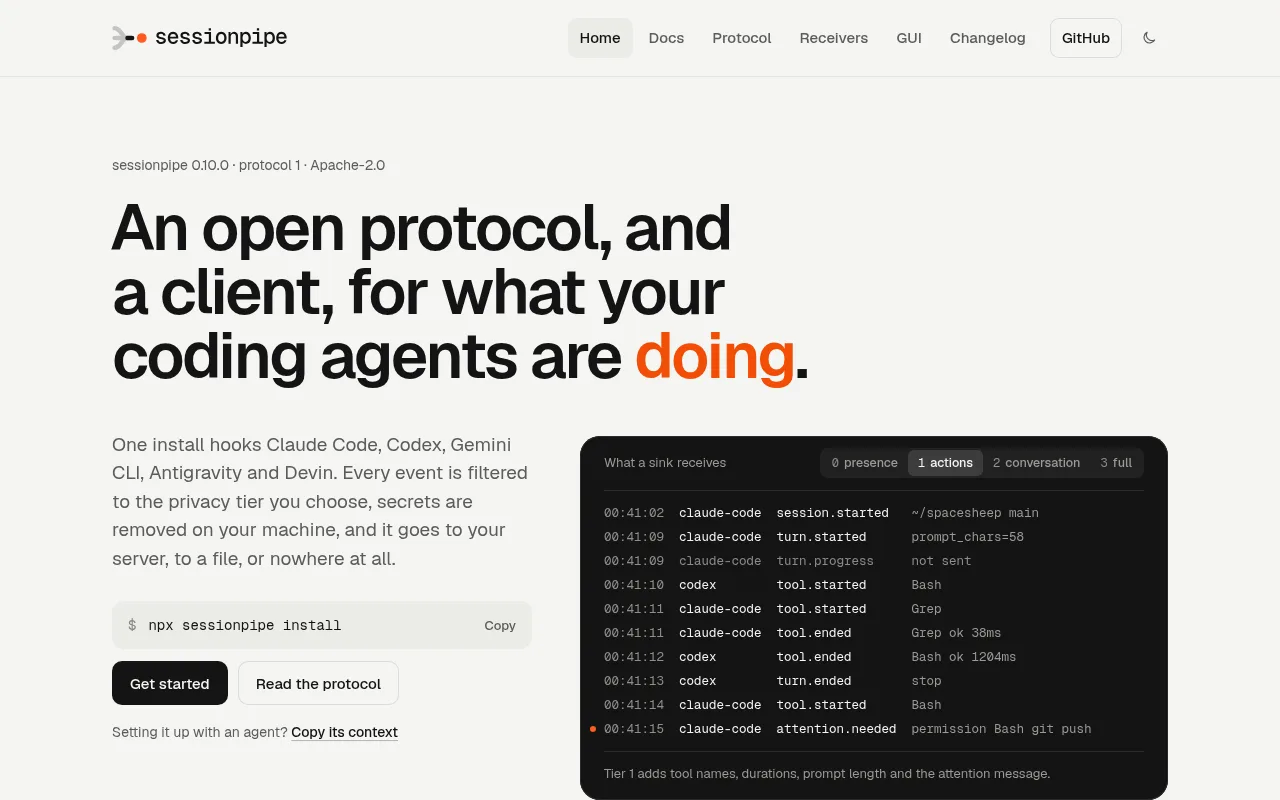
The home page puts it in one line: “An open protocol, and a client, for what your coding agents are doing.” (sessionpipe.org, 2026-10-27). It has two halves. The spec lives in spec/ with JSON Schemas and a conformance suite, licensed CC BY 4.0. The client is the sessionpipe CLI plus sessionpipe-core, sessionpipe-receiver and sessionpipe-conformance on npm, published unscoped “until the @sessionpipe npm org exists” (changelog, 0.1.1).
The timeline is short. The protocol repository was created on 2026-09-28 and 0.1.0 shipped the same day; 0.10.0 landed on 2026-10-26. The governance page names one maintainer, Michael Makarov (@micmmakarov), and describes “one maintainer today and a written path to more”; the repo’s trademark note credits the mark to him. The GitHub organisation is spacesheep-dev; spacesheep.dev, which we reviewed as a publishing surface earlier this month, is one of three listed receivers.
On 2026-10-27 the protocol repo had 14 stars and the GUI repo had 4. That’s the honest scale. What makes it worth a review anyway is the design, which is more careful than most tools ten times its age.
How does sessionpipe work?
One event’s life goes like this. A harness fires a hook. An adapter maps the payload onto a protocol event. The secrets@1 ruleset scrubs every string. The event lands in a local, append-only outbox. For each sink you configured, a filter cuts the event down to that sink’s tier and the client POSTs a batch over HTTP. If the event is attention.needed, it reaches your board or phone; your answer travels back over the control channel, signed on your device and checked on the machine before anything runs.
Hooks and adapters
The adapters page says an adapter “is the only vendor-specific code in sessionpipe”: one file per harness plus fixtures “recorded from a real payload”. Five harnesses are hooked today, claude-code, codex, gemini-cli, antigravity and devin; cursor, copilot-cli, droid, kiro and opencode are specified for milestone M7 with fixtures “(recording pending)”. The repo counts the hook events it registers: Claude Code 14, Codex 12 plus notify, Gemini CLI 8, Antigravity 4, Devin 8.
sessionpipe install writes one entry per event into the harness’s own settings file; sessionpipe uninstall “Removes only the entries it wrote; every config file is byte-identical otherwise” (get started). The hook “reads stdin, writes one job file, spawns a detached worker and exits 0”. The protocol’s invariant is blunt: “Nothing in this protocol may block or alter the harness”, with one exception covered below. An adapter never reads a credential file and never calls a vendor API.
Events
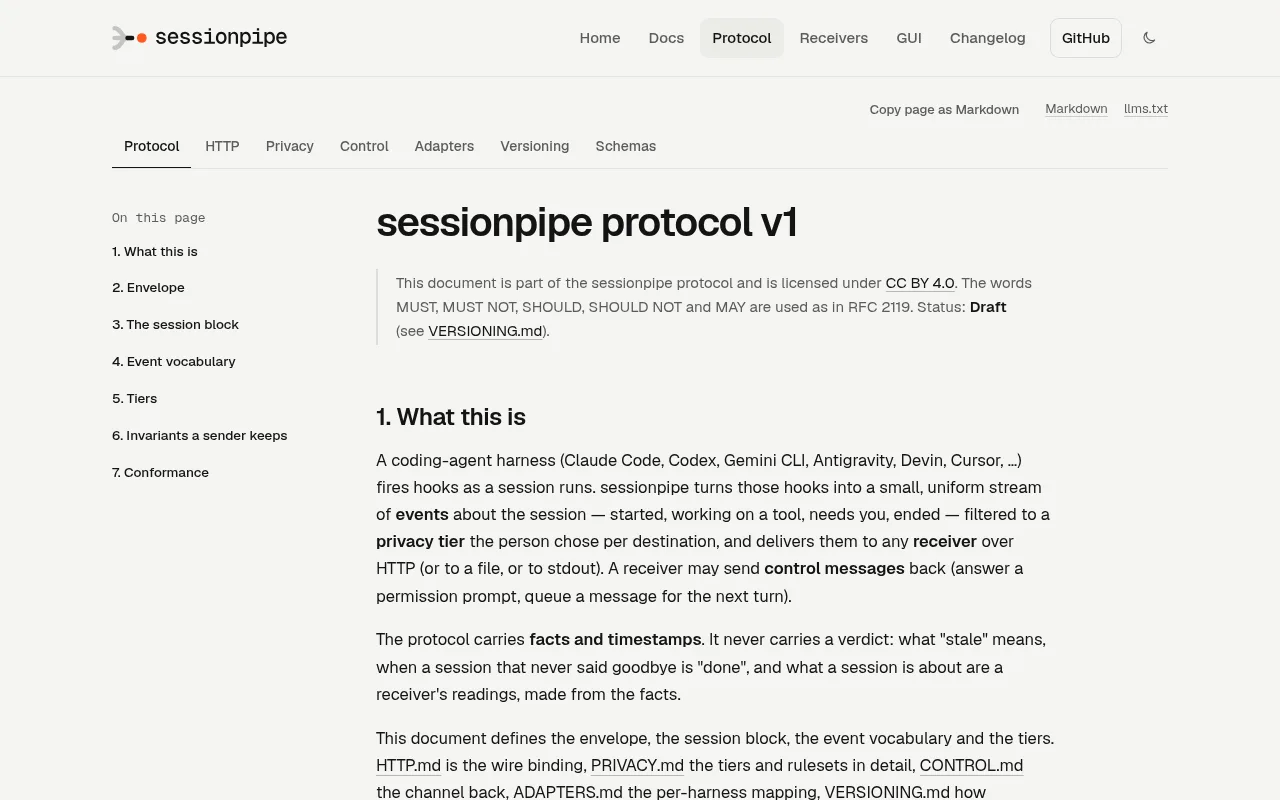
Every event is one JSON object with nine members: protocol, id (a ULID), type, time, tier, harness, session, privacy and data. The 17 types: session.* (started, heartbeat, ended, backfill, forgotten), turn.* (started, ended, transcript, progress), tool.* (started, ended), files.changed, attention.* (needed, cleared), subagent.* (started, ended) and context.compacted, plus the literal native, which only the native lane carries and the client never emits. A receiver “MUST accept and store an unknown type”; deduplication is on (harness.name, session.id, session.seq).
Privacy tiers
The site’s agent file states the four tiers in one table:
| Tier | What leaves the machine |
|---|---|
| 0 | session state and timing, machine, folder, repo, branch, model, title; the kind of attention needed |
| 1 | + tool names, durations, ok/error, file paths, the attention message, subagents |
| 2 | + the person’s prompts and the assistant’s replies, redacted |
| 3 | + tool input and output, thinking, raw hook lines |
Three rules matter more than the table. Filtering “removes by allowlist per type, never by denylist”. The secrets ruleset “runs on every string above tier 0 before an event reaches the outbox, and cannot be turned off per sink”. And “Default is 0”: a sink added without --tier sends presence only (privacy spec). A second ruleset, pii@1, is opt-in with --pii: emails become [email], phones [phone], the machine name a hash.
The same page says what the project itself does: “No telemetry: the client reports to the sinks the person configured and to no one else” and “No hosted receiver: the project operates no server that receives anyone’s data.” It’s just as clear about its limits: “secrets@1 is good, not perfect; treat every stored string as though it might contain one.”
Sinks and receivers: the HTTP binding
A sink is a URL, a file or stdout. sessionpipe tail --tier 1 prints “exactly what a tier-1 sink would receive”, no server needed.
A receiver’s contract is small (HTTP binding). Serve GET /.well-known/sessionpipe declaring max_tier, capabilities and batch limits. Accept POST {events} batches of up to 50 events or 256 KiB. Answer 202 with counts of accepted, duplicates and rejected; answer 403 above your max_tier. On failure the sender backs off “2 s · 10 s · 60 s · 5 min · 30 min, then every 30 min, forever”, and “The sender’s cursor moves only on 202.” The receivers page says examples/minimal-receiver/ is 40 lines. Three receivers are listed: the reference sessionpipe-receiver (max_tier 3), sessionpipe-gui (3) and spacesheep.dev (2). The conformance badge reads “pending” on all three.
The control channel
Events flow out; control flows back: a message for the agent, a permission answer, a cancel, a new session. The control spec states the principle in two sentences: “A receiver decides whether to send. Only the machine decides whether to run.”
Commands are signed on your device with a WebAuthn passkey, or since 0.10.0 a hardware-held device key, and verified on the machine against keys that enter its trust store “only from that machine’s own terminal”. Pairing is sessionpipe control pair <receiver>: six digits on the terminal, approved with a passkey. A bearer token “authenticates the transport only. It never authorizes a command.”
The PermissionRequest hook waits for a signed answer “while the terminal shows its own prompt: whichever answers first wins”, and “Nothing is ever auto-allowed”. The machine picks one of three modes at its own terminal, safe (the default), auto or inherit, and “no command may turn a harness’s approval off”: the daemon never writes bypassPermissions, --dangerously-* or --yolo. Six delivery modes are tried in order (sdk, waiter, turn, api, resume, fork); sessionpipe wait parks in a session’s background so a message lands “in about 60 ms with no network”. New sessions are capped by the machine, not the receiver: the reference daemon allows 2 at once and 10 an hour.
In the language of our approval workflow guide, this is a block-and-ask gate that fails closed, implemented at the harness’s documented hook answer rather than around it. It’s the same shape we build into client agents: the agent stops, a person with the right key says yes, and the log shows who.
The GUI: sessionpipe-gui
sessionpipe-gui is a separate repository, created 2026-10-15, Apache-2.0, at v0.4.1. The site’s line for it is “Every session on your machines, live, on one board.” The README’s is “One process shows every coding-agent session on your machines as it happens, open from any device on your network.” Two nuances. The README says the GUI “is not part of the sessionpipe project and is not endorsed by it”. And “no server” means no server of theirs: it’s one Node process on your machine serving the board on localhost:7373, and that process is a receiver.
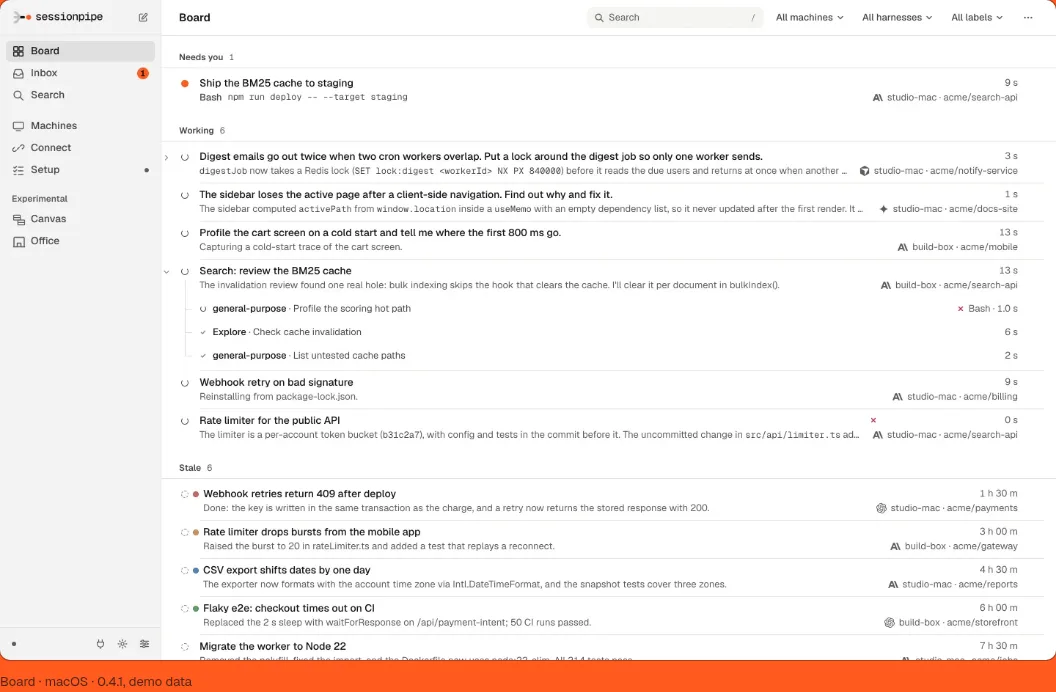
The Board groups sessions as needs you, working, stale, idle and done. Search covers every session the board holds plus this machine’s own agent history, indexed locally; the README’s figure is “about 1.5 ms at the median” on the author’s Mac (the README’s number, not ours). Remote steering covers permission prompts, messages and new sessions: “Each command is signed by your passkey and checked on the machine that runs the agent.” Without pairing, it’s a read-only board. On first run a QR code opens the board on a phone over Wi-Fi or Tailscale.
The README also lists an inbox of open prompts from every machine, colour labels, subagent trees, a Review view, and two experimental views, Canvas and Office. Platforms: a notarized macOS .dmg, a Linux .deb and AppImage, or npm i -g from the release tarball; Node 20 or newer.
On our machine, the first-run Setup checklist walks six steps: Your sessions, Secure address, Pair this machine, Your phone, Try it, From anywhere.
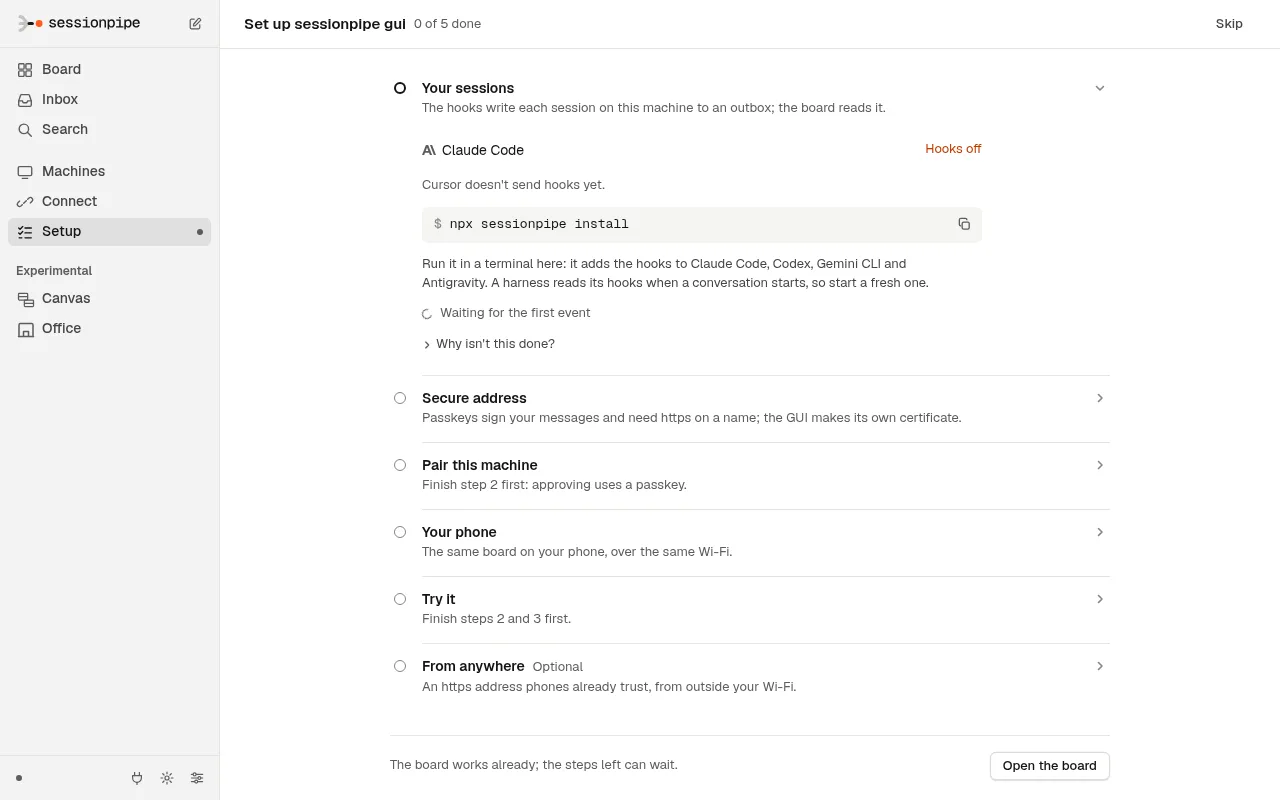
What it doesn’t do yet, per the README: “Is it on npm? Not yet.” An iPhone build “runs in the simulator and is not released”. Cursor, Copilot CLI, Droid, Kiro and OpenCode are “next”. Search never indexes tool output, thinking or anything the harness redacts. “Putting the port on the public internet is not supported.” The desktop app’s Touch ID signing “needs a receiver and a machine that take device keys (sessionpipe 0.10)”; otherwise you send from a browser.
Who is it for? Four use cases
The home page names a use per tier. The reader we have in mind is the AI operator, the person driving the agents all day across a laptop, a workstation and a cloud box.
A presence board for a team (tier 0). “A board of who is working, who needs you, who is done.” Run a shared receiver at max_tier 0 or 1; the privacy spec says a receiver “serving more than its operator SHOULD declare max_tier ≤ 1”. Retrofitting oversight onto agents that already run is the cheapest form of the monitoring and guardrails work we do.
Needs-you alerts away from the desk (tier 0 or 1, plus control). attention.needed goes to the board, or to examples/slack-webhook/, a Cloudflare Worker that posts “needs you: Bash on misha-air”. Pair the machine and you answer from a phone, signed. This is the operator’s side of the moment our human-in-the-loop MCP post covers from the builder’s side.
Memory and search across agents (tier 2). turn.transcript and turn.progress carry prompts and replies, redacted, to the GUI’s local index or a receiver of your own.
Full replay on a box you own (tier 3, plus the native lane). Tool input and output, thinking, raw hook lines; the HTTP spec says the native lane “exists for a receiver you own on a machine you own”. This is the control-center idea applied to the agents themselves; we built one for an editorial network with 1,000 posts/day capacity, QA gates, and under 5 minutes of operator time per 100 posts.
How does it compare to the alternatives?
The fair frame first: sessionpipe doesn’t replace a harness’s hooks. It’s built on them. Each row carries the vendor’s or project’s own words.
| Tool | Harnesses | Where data goes | Steer back? | Privacy control | Source |
|---|---|---|---|---|---|
| Native hooks: Claude Code | Claude Code | Wherever your handler sends it | Yes, via the hook answer | None built in | Claude Code hooks: more than 30 events, handler types command, http, mcp_tool, prompt, agent (experimental) |
| Native hooks: Codex | Codex | Wherever your handler sends it | Yes, via the hook answer | None built in | Codex hooks: 12 events in ~/.codex/hooks.json; non-managed hooks “must be reviewed and trusted before they run” |
| Native hooks: Gemini CLI | Gemini CLI | Wherever your handler sends it | Partly: its ToolPermission notification “has no answer channel” (control spec) | None built in | Gemini CLI hooks: 11 events, type “only command is supported” |
| Claude Code OpenTelemetry | Claude Code | Any OTLP backend | No | Prompts “default: disabled”; user.email “Always included when available” | Monitoring: “across your organization” |
| Claude Code Remote Control | Claude Code | Anthropic servers while connected | Yes, from claude.ai or the app | None beyond the plan | Remote Control: “Pro, Max, Team, and Enterprise”; ZDR and HIPAA orgs “can’t enable Remote Control” |
| claude-vigie (MIT) | “Claude Code, and nothing else” | Your central server, SQLite | No: “vigie never writes into a session” | None stated | claude-vigie: “Linux only” |
| Claude Nexus (MIT examples, CC BY-SA 4.0 docs) | Claude Code family | Your self-hosted dashboard | Yes, an in-browser Chat page | None stated | claude-nexus: “not productized, not multi-tenant, not a SaaS offering”; “a blueprint, not a turnkey app” (author’s post) |
| Hook-to-push scripts (MIT) | Claude Code | ntfy.sh | Yes: Allow/Deny (claude-push) or Approve/Deny (claude-remote-approver) buttons on the notification | claude-push: “The ntfy topic name acts as a shared secret” | claude-push, claude-remote-approver: PermissionRequest hook only |
| sessionpipe (Apache-2.0, spec CC BY 4.0) | Five hooked, five more specified | Only the sinks you add, each at its tier | Yes, signed on device, verified on machine | Tier allowlist per sink; secrets ruleset always on; pii@1 opt-in | sessionpipe.org: Draft spec, conformance pending |
Remote Control is the closest thing to sessionpipe for one harness, and for one Claude Code session from your phone with zero setup it’s the simpler answer. The trade-off is spelled out in the docs: “While Remote Control is connected, the session transcript, including your messages, Claude’s responses, and tool activity, is stored on Anthropic servers.”
Then there’s the gap none of these fill. Claude Code issue #35607, opened 2026-03-18, asked for a session dashboard on claude.ai and mobile: “When I open claude.ai on my phone, I expected to see all my running Claude Code terminal sessions and be able to jump into any of them.” The stale bot closed it as not planned on 2026-04-15, with no maintainer reply. Every tool on page one for that query is Claude-Code-only. sessionpipe is the only one in this set that is harness-neutral by design.
Getting started
Four ways in, from the get-started page.
Hooks only, nothing sent. install detects your harnesses, writes their hooks, installs itself globally if run through npx, and backfills 30 days of sessions into a local outbox. “Nothing leaves the machine yet.”
npx sessionpipe install
sessionpipe tail --tier 1
Add a destination. sink add reads the receiver’s well-known file, caps the tier at its max_tier, stores the token and sends one heartbeat as a test. Without --tier the sink is tier 0.
sessionpipe sink add https://your-receiver.example --tier 1 --token <t>
sessionpipe status
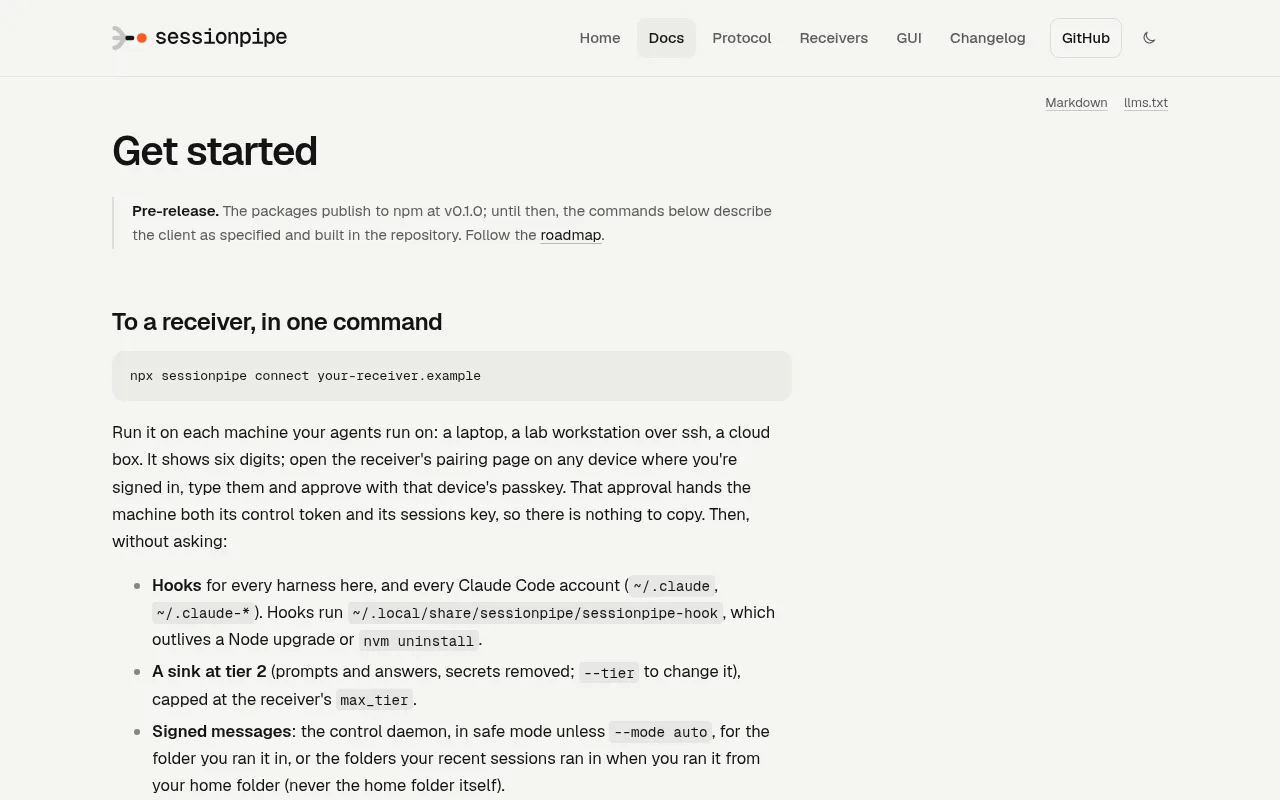
One command to a receiver that offers pairing. Six digits and one passkey approval set up hooks for every harness, the control daemon in safe mode, keys in the keychain and 30 days of backfill. Read before you run: connect sets up “A sink at tier 2”, where sink add defaults to tier 0.
npx sessionpipe connect your-receiver.example
The GUI, or the reference receiver. The board is on localhost:7373 with a QR code for your phone; the .dmg and .deb are on the home page.
npm i -g https://github.com/spacesheep-dev/sessionpipe-gui/releases/download/v0.4.1/sessionpipe-gui-0.4.1.tgz
sessionpipe-gui
# or the reference receiver:
npx sessionpipe-receiver --port 7357 --token <t> --max-tier 3
sessionpipe doctor checks the lot; sessionpipe uninstall undoes it. One detail we liked: /agent.md on the site is written to be pasted into an agent, with rules such as “Never choose or raise a tier on the person’s behalf”.
Pros and cons, honestly
Pros
- Privacy is structural, not a checkbox. Tier allowlists per sink, a secrets ruleset that can’t be disabled per sink, “No telemetry”, and no hosted receiver (privacy spec).
- Harness-neutral. Five adapters, with fixtures recorded from real payloads for Claude Code, Codex and Devin (adapters).
- The control design beats bearer-token remote control. Signed on the device, verified on the machine, nothing auto-allowed, bypass flags never written (control spec).
- Delivery is boring in the right way. Append-only outbox, cursor moves only on 202, dedup on
seq, backoff forever (HTTP binding). - The whole site is Markdown for agents.
/llms.txt,/llms-full.txt,/agent.md, and<page>/index.mdfor every page (docs).
Cons
- Draft, and young. The repo dates from 2026-09-28. The spec is “Draft until two independent receivers pass the conformance suite”, and the badge reads “pending” for all three listed receivers. 14 and 4 stars on 2026-10-27.
- One maintainer. The governance page says it: “the maintainer list above is the bus factor, stated plainly.”
- Fixture gaps. Gemini CLI and Antigravity rows are “(recording pending)”. Antigravity has no session end, and 0.6.1 had to remove a PreToolUse hook that “blocked every tool call on every machine it was installed on” (changelog).
- The GUI is early. Not on npm, iPhone unreleased, five harnesses “next”, public exposure unsupported, and the “no server” tagline needs the “it’s your Node process” reading.
- Operational surface. The control daemon checks npm daily and updates itself by default (off with
sessionpipe update off, per the security page). Per-harness quirks: Codex hooks need trust, Gemini CLI’s own telemetrylogPromptsdefaults on, and Devin “rejects the WHOLE file” of hooks on one unknown event name. Andsecrets@1is “good, not perfect”, in the spec’s own words.
Mikhail’s part in it
Facts only, from the GitHub API on 2026-10-27. In spacesheep-dev/sessionpipe, Mikhail is the top contributor by commit count: 83 of the human commits, against 79 for the maintainer (@micmmakarov), 20 for @yaroslavvb and 3 for @connorburgess. He authored 42 of 106 merged pull requests. In spacesheep-dev/sessionpipe-gui he is the only listed contributor, with 83 commits and all 26 merged pull requests. In one line: the top contributor by commits to the protocol repo and the main author of sessionpipe-gui.
What that means: this review is written from inside the repo, which is why the cons list names changelog entries rather than vibes. It also means you should read this as a review by someone close to the project: Mikhail works with the team behind sessionpipe, as the disclosure at the top says. The commits and pull requests are public, so you can check his work yourself.
One more data point on how the project takes outside input. The 0.1.1 changelog credits “the first outside install” by Yaroslav Bulatov, issues #8 to #14 and a security advisory, as the source of that release’s fixes. That’s the pattern we look for before we put time into open source: a maintainer who ships the fixes a stranger reports, in the same week.
Should you install it?
Install sessionpipe if you run several agents on several machines and care what leaves them; if you run one Claude Code session and have a Pro plan, use Remote Control first. For the first group, npx sessionpipe install plus sessionpipe tail costs nothing and sends nothing; add the GUI when you want the board, and pair a machine when you want to answer from your phone.
The “needs you” moment sessionpipe surfaces is the one we design into every agent we ship. AI agent development (from $3,500) delivers agents with “Approval gates for consequential actions” and a “Full audit log: every action, every input, every decision”. When the thing you want to watch is a whole process rather than a session, an AI control center (from $5,000) adds the “Control-center GUI: queues, approvals, kanban, oversight”. For the builder’s side of the same moment, read our human-in-the-loop MCP post; for the rest of the agent and automation work we ship, start at the hub.
Questions we actually get
What is sessionpipe?
sessionpipe is an open protocol and a small command-line client for what your coding agents are doing. It installs hooks into Claude Code, Codex, Gemini CLI, Antigravity and Devin, turns each hook into one of 17 event types, removes secrets on your machine, and sends the events to destinations you choose, each filtered to a privacy tier. The protocol is CC BY 4.0, the code Apache-2.0, version 0.10.0 as of 26 October 2026.
Does sessionpipe send my prompts anywhere?
Only if you choose tier 2 or higher for a destination. Tier 0 sends session state and timing, tier 1 adds tool names and durations, tier 2 adds your prompts and the assistant's replies with secrets removed, tier 3 adds tool input and output. A sink added without a tier is tier 0. The project runs no hosted receiver and the client has no telemetry.
Can I answer a Claude Code permission prompt from my phone with sessionpipe?
Yes, through a receiver that lists the control capability, such as sessionpipe-gui. The answer is signed on your device with a passkey and verified on the machine against a key you enrolled at its own terminal. The hook waits for your signed answer while the terminal shows its own prompt, whichever comes first wins, and nothing is ever auto-allowed.
How is sessionpipe different from Claude Code Remote Control?
Remote Control steers one running Claude Code session from claude.ai or the mobile app and stores the transcript on Anthropic's servers while connected. sessionpipe is harness-neutral, shows every session from every machine on one board, lets you pick how much leaves each machine, and sends events only to receivers you configure. For a single Claude Code session with no setup, Remote Control is simpler.
Is sessionpipe production-ready?
Not yet, by its own documents. The protocol is marked Draft until two independent receivers pass the conformance suite, every listed receiver shows conformance pending, the governance page names one maintainer, and the GUI is version 0.4.1 and not on npm. Installing the hooks and watching locally with sessionpipe tail sends nothing anywhere, so trying it is low-risk.